
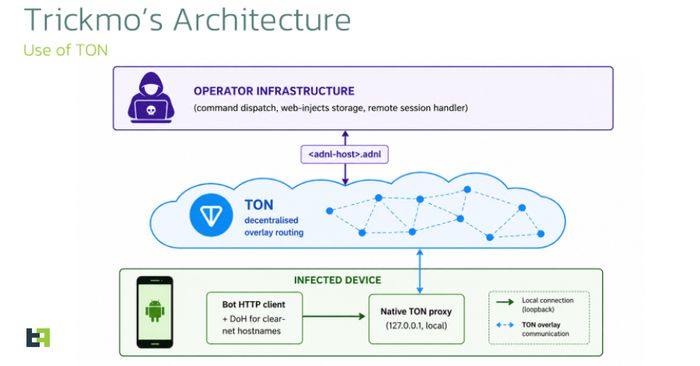
Security researchers have discovered a new variant of TrickMo, a well-known piece of Android malware that targets banking apps. This updated version is more dangerous than before: once installed on your phone, it quietly turns your device into an internet relay that bad actors can use to route their own traffic through your connection. That means attackers can use your phone’s identity online, potentially to access banking sites and services while appearing to be you.
TrickMo typically spreads through fake apps or malicious links sent in text messages and emails. It does not come from the official Google Play Store. Affected devices include Android smartphones and tablets running versions before the latest monthly security patch — keeping your phone updated is the single most effective protection.
How to check if you’re affected
Affected devices are Android phones and tablets, particularly those with older security patches or apps installed from outside the Play Store. Take these steps:
- Check your Android security patch level: go to Settings → About phone → Android security patch level. If it is more than two months old, update your phone via Settings → Software update.
- Review your installed apps: go to Settings → Apps and look for anything you don’t recognise or didn’t consciously install. Delete it immediately.
- Check app permissions: remove any suspicious app that has been granted accessibility, SMS, or screen-overlay permissions.
- Only install apps from the Google Play Store and avoid downloading apps from links sent by text message or email.