
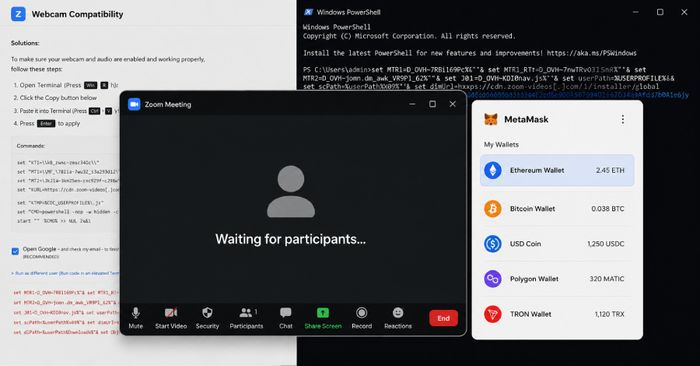
A North Korean hacking group known as BlueNoroff is targeting people in the cryptocurrency and finance world using a convincing fake Zoom meeting trick. The attack starts with a message from a compromised Telegram account — often someone you may already know — sharing a meeting link through Calendly. That link takes you to a fake Zoom website that looks authentic, asks for camera permissions, and then plays a pre-recorded video featuring an AI-generated face while attackers quietly scan your computer for crypto wallet browser extensions and estimate how much digital currency you hold.
Once the attackers decide you’re a valuable target, a fake pop-up appears claiming your “Zoom SDK” needs an update. Following those instructions installs malware that can steal saved passwords, drain crypto wallets, intercept your internet traffic, and give attackers ongoing access to your device. The campaign has been active since late 2024 and is specifically designed to identify high-value targets before striking — meaning not everyone who visits the fake page gets infected, only those with significant holdings.
How to check if you’re affected
Affected versions include all Zoom clients on Windows and Mac, since this attack relies on a fake Zoom website rather than a vulnerability in Zoom itself. If you recently joined a video call through a Calendly link sent to you via Telegram by someone you hadn’t contacted in a while, and were then prompted to install a “Zoom SDK Update” by running a terminal or PowerShell command, treat your device as compromised.
Steps to take:
- Run a full antivirus scan and look for unfamiliar processes or recently installed browser extensions.
- Check your crypto wallet extensions and accounts for any unrecognized transactions.
- Change passwords for your email, crypto exchanges, and any services you were logged into during or after the call.
- Contact your crypto exchange’s support team if you see unauthorized withdrawals.