
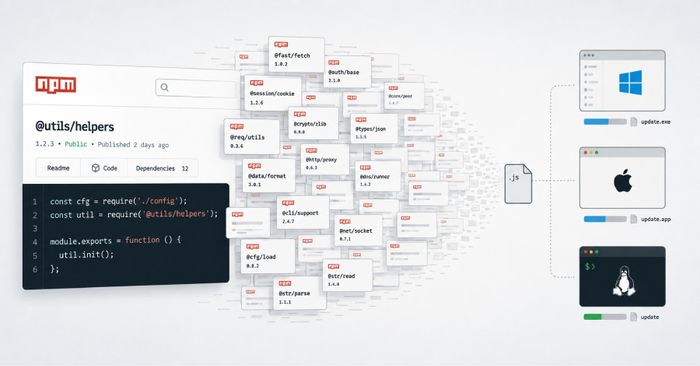
Researchers have discovered nearly 800 malicious packages published to the npm registry that deliver a cross-platform remote access trojan (RAT) and infostealer to any developer who installs them. The packages use AI-generated or randomly constructed names designed to look like legitimate libraries — a technique called typo-squatting — but all of them hide the same malware inside. Unlike most npm supply chain attacks, these packages don’t trigger during installation via lifecycle hooks. Instead, their README files instruct developers to load them manually with Node’s require() function, which means the malware only runs after a developer follows the documentation.
When the package is loaded, it executes a downloader called WEL1DROPPER. The dropper identifies the operating system and processor architecture of the machine, then fetches a matching payload from one of three Cloudflare Workers domains. If those fetches fail, it falls back to DNS TXT records from the domain wel1[.]ru to deliver the payload in encrypted chunks — a technique that makes the traffic hard to distinguish from legitimate DNS queries. On Windows, the final payload patches Event Tracing for Windows (ETW) and the Antimalware Scan Interface (AMSI) to blind monitoring tools, checks for sandboxes and virtual machines, and establishes persistence via a Registry Run key and a scheduled task. On macOS, a similar infection chain runs analysis-evasion checks and downloads a binary named beacon_mac.bin. Sonatype, which is also tracking the campaign under the name “Flooding Dropper,” noted that Windows victims also receive an encrypted follow-on payload (/pkg/update_win.exe) from the attacker’s infrastructure.
How to check if you’re affected
Affected products are any Node.js projects that installed npm packages from this campaign. If your project recently added an unfamiliar dependency — especially one with a random-looking or AI-generated name — check your package.json and package-lock.json for packages you did not explicitly choose. Look for active network connections to the domains wel1[.]ru, oob-worker.cf103-070.workers.dev, oob-worker.cf102-baf.workers.dev, or oob-worker.cf99-9b3.workers.dev. On Windows, look for a new Registry Run key or scheduled task added around the time of the suspicious install, and for the file update_win.exe in a temp folder. On macOS, look for beacon_mac.bin in /tmp or your user temp directory.