
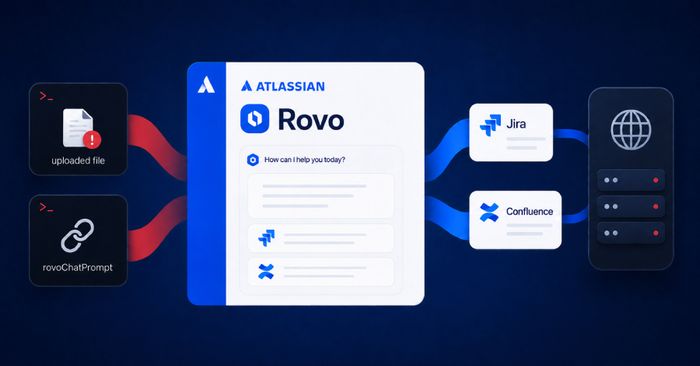
Two independent research teams have demonstrated ways to manipulate Atlassian’s Rovo AI assistant into secretly collecting and sending sensitive workspace data to attacker-controlled servers. Rovo is Atlassian’s AI assistant embedded inside Jira and Confluence, where it can read project tickets, documentation pages, and connected data sources on behalf of logged-in users — which is exactly what makes it an appealing target.
Security firm PromptArmor found that attackers can hide malicious instructions inside documents that a legitimate user uploads or asks Rovo to process. When Rovo reads the document, the hidden instructions divert the assistant: it silently gathers data from the user’s accessible Jira tickets and Confluence pages and forwards it to the attacker’s server. The attack works even with Rovo’s web-search capability disabled, because the assistant has a separate URL-retrieval mechanism that the malicious instructions exploit. PromptArmor reported this in May 2026 and published details on August 5; as of publication, Atlassian had not confirmed a fix for the content-borne path. Separately, Varonis researchers found that the rovoChatPrompt URL parameter could be used to preload attacker instructions into Rovo Chat — meaning one click from an authenticated user was enough for Rovo to execute the instructions under that user’s privileges and exfiltrate accessible data, including private API keys stored in Confluence, SharePoint documents, and Outlook emails connected through Rovo integrations. Atlassian patched the URL-parameter issue server-side on July 8, 2026; no customer action was required for that fix.
How to check if you’re affected
Affected products are all Atlassian Cloud tenants with Rovo enabled. If your organization uses Rovo in Jira or Confluence, the URL-parameter (RovoBlast) path has been patched automatically — no action needed there. For the content-borne prompt injection path, Atlassian has not yet issued a confirmed fix. As a compensating control, administrators can disable Rovo access for specific apps, projects, or user groups from the Atlassian admin console under Atlassian Intelligence settings. Review which users and integrations have Rovo enabled, and consider restricting access to data sources (SharePoint, Outlook) connected through Rovo until a full fix is available.