
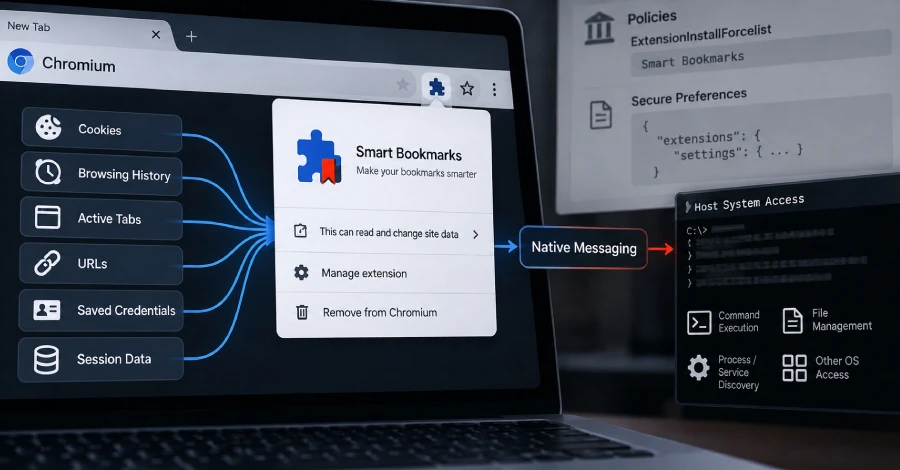
Cybersecurity researchers at SOCRadar have published details of a sophisticated post-compromise toolkit called PEEP, which disguises itself as a browser extension called “Smart Bookmarks” and transforms compromised Chrome or Edge installations into persistent, OS-level backdoors. The malware does not exploit a browser vulnerability to get in — it requires an attacker to already have administrative access to a machine — but once installed, it dramatically extends the attacker’s foothold far beyond the initial breach.
PEEP injects itself directly into Chrome or Edge user profiles, bypassing the browser’s Web Store integrity checks by tampering with Chromium’s own Secure Preferences file. A companion executable called nm_host.exe serves as a bridge between the browser and the underlying operating system, enabling the attacker to run shell commands, manage files, and enumerate running processes — capabilities that would ordinarily be impossible for a browser extension constrained by the sandbox. Once active, PEEP checks in with its command-and-control server every 30 seconds, exfiltrating browsing history, session cookies, open tab metadata, and the machine’s public IP address. It can also inject JavaScript into active pages, take screenshots, read clipboard contents, and modify web content — giving attackers everything they need to hijack live sessions with banking, email, or SaaS platforms. The malware is built on RedExt, an open-source browser red-teaming framework previously linked to GlassWorm attacks, and Chinese-language artifacts in its source code suggest a Chinese-speaking threat actor, though SOCRadar has not attributed the campaign to any known group. SOCRadar’s visibility into the C2 infrastructure showed 34 registered agent entries, 10 active sessions, and over 500 data records at the time of disclosure.
How to check if you’re affected
Affected products include any Windows or Linux machine where an attacker has already gained administrative access and where Chrome or Edge is installed. Defenders should look for the extension ID ejkndncpkdcjcikfhiamcdehdoegilbj appearing in browser profiles under the name “Smart Bookmarks,” and for the file nm_host.exe in user-writable directories. Network defenders can hunt for outbound HTTP connections to 206.237.30[.]232 or the domain xfjcc[.]fun. Enterprise administrators should audit Chrome or Edge management policy entries in ExtensionInstallForcelist for unauthorized extension IDs not sourced from the Chrome Web Store.